Notary journal · iPhone & iPad · Pay once

Amend it. Never erase it.

A paper journal's discipline, with the search paper can't do. Attest is an electronic notary journal that lives on your phone: every act a numbered, timestamped entry, locked when the signer signs, and linked to the one before it. Mistakes get an amendment or a void that points back to the original, so nothing is ever rubbed out. No account, no cloud, no subscription.

Download Attest on the App Store

$19.99 once. No account, no subscription, every future update included.
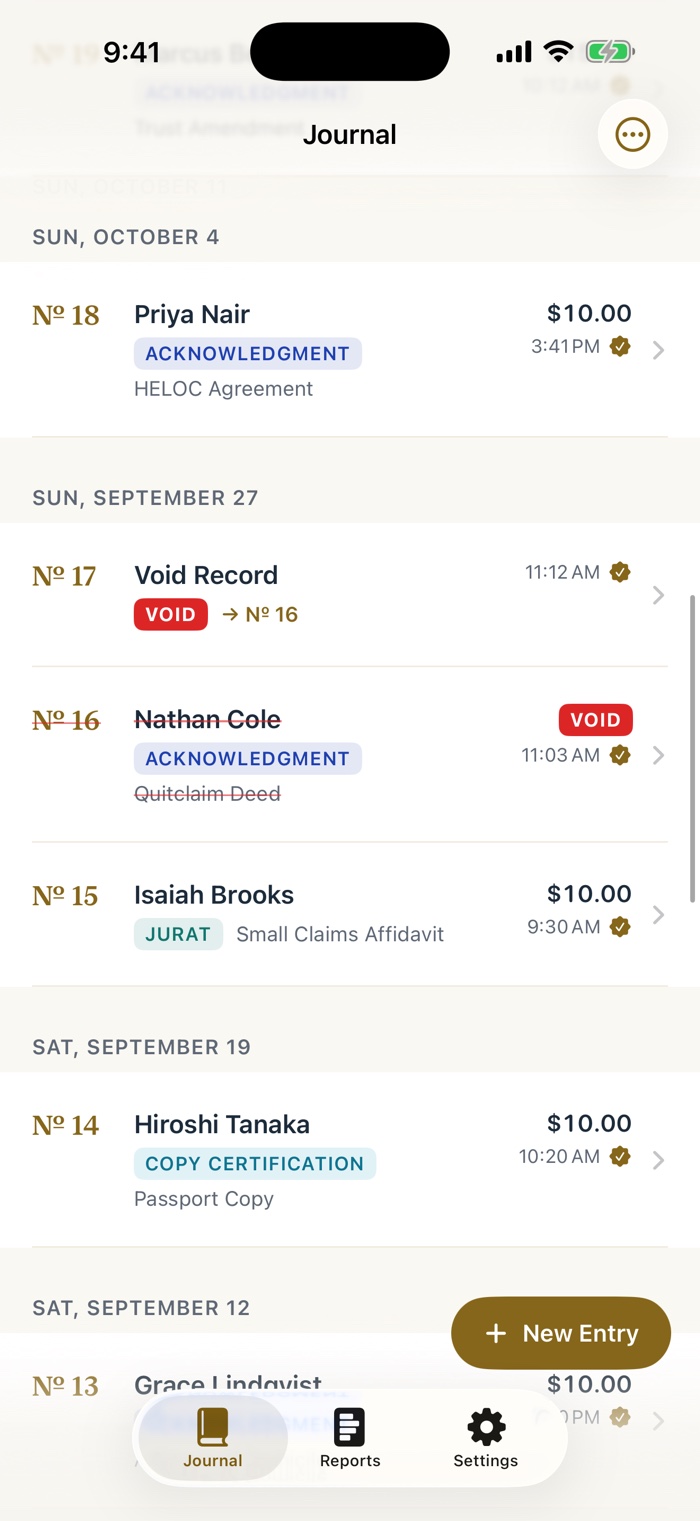
Attest's Journal tab. Entry Number 18 is an acknowledgment. Number 17 is a Void Record with a red VOID badge and an arrow to Number 16. Number 16 is struck through, still legible, with a red VOID badge. Number 15 is an affidavit and Number 14 a copy certification.

38-second tour

Watch an entry get locked.

Scan the license, hand over the phone, seal the entry, then see how a correction works. The captions are on screen, and the sound is one tap away.

Read the narration

You verify identities for a living. Your journal shouldn't send them to somebody's cloud.

This is Attest. Every act becomes a numbered entry, in order. Scan the license, hand over the phone, and they sign right here.

Locked the moment it's signed. A hash chain makes any change evident.

Made a mistake? Amend it. Never erase it. The original points to the fix, forever.

Audit day? One tap verifies the whole chain. One clean PDF.

No cloud. No account. No subscription. Attest. Pay once, and it's yours.

A journal that behaves like paper

Permanent. Sequential. Searchable.

Paper is trusted because nothing in it can quietly change. Attest keeps that discipline and adds the part paper can't do: finding any entry in a second, totaling your fees, and handing an auditor a clean export.

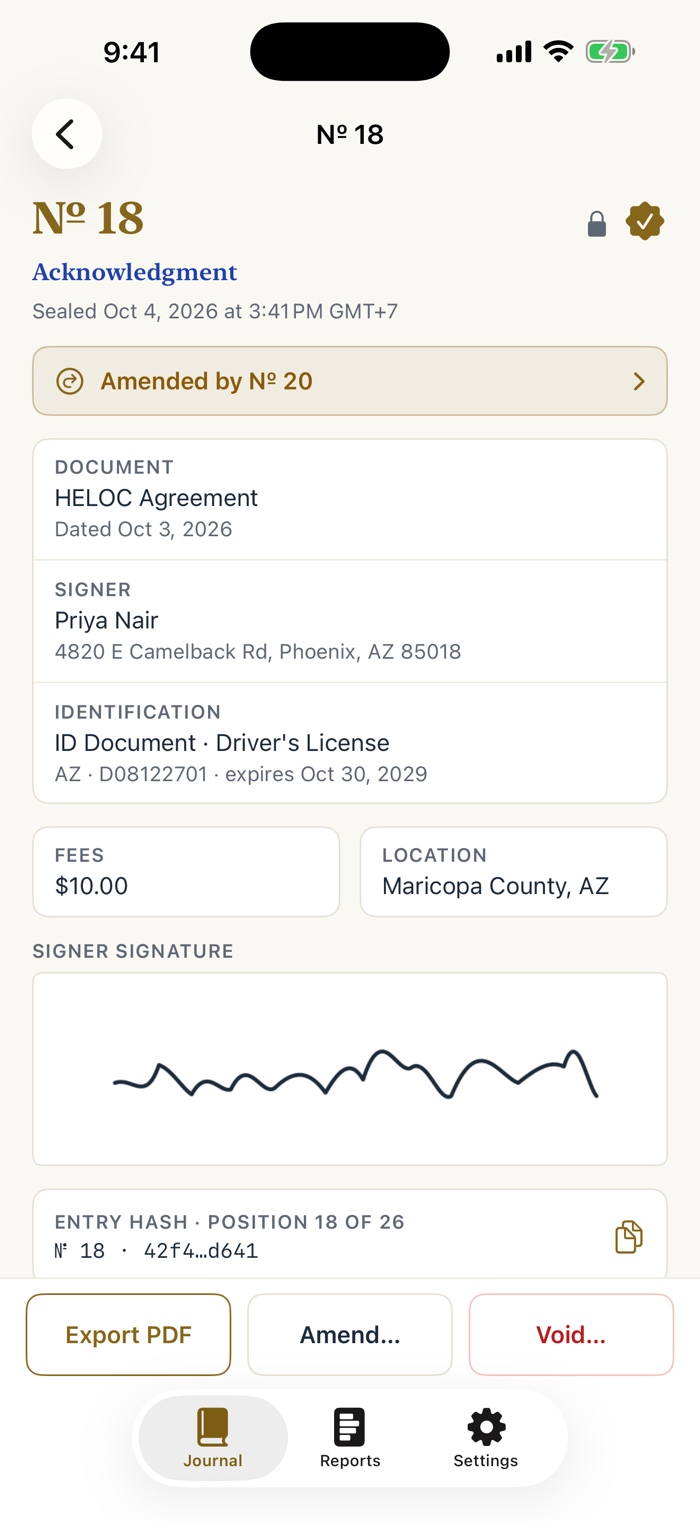
Entry number 18, an acknowledgment, sealed Oct 4. A banner reads Amended by Number 20. Below are the document, signer, identification, fee and location cards, the signer's signature, and an entry hash line reading position 18 of 26. The toolbar offers Export PDF, Amend and Void.

Corrections that never erase

Amend it. The original points to the fix.

Open any entry and choose Amend. The correction is a new entry that points back, and the original shows "Amended by № 20" for good. The new entry carries "Amends № 18", so you can walk the trail from either end.

An act that didn't happen gets a Void: struck through, still legible, exactly like the single-line cross-out in a paper journal.

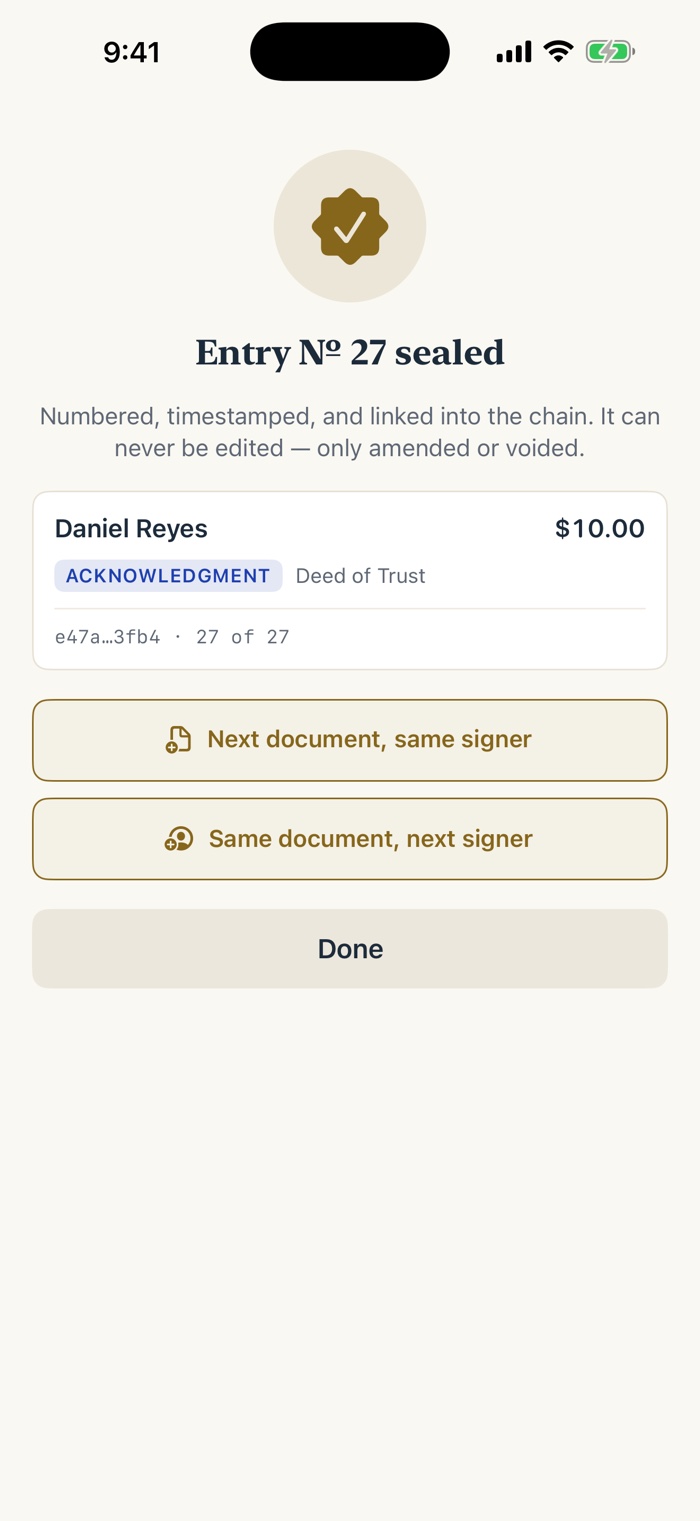
The seal confirmation. A gold badge, then the heading Entry Number 27 sealed, and the line Numbered, timestamped, and linked into the chain. A card shows the signer, an acknowledgment badge, the document, and a hash reading position 27 of 27. Buttons read Next document, same signer; Same document, next signer; and Done.

Locked means locked

Sealed, numbered, linked to the one before.

Saved entries can never be edited or deleted. A cryptographic hash chain links every entry to the one before it, so any change to the record is evident to you, to an auditor, to anyone you hand the export. Attest is sequential and tamper-evident, the same words an auditor uses about a paper book.

Finishing an entry takes the signer's signature on your screen, plus an optional camera thumbprint and an optional GPS stamp.

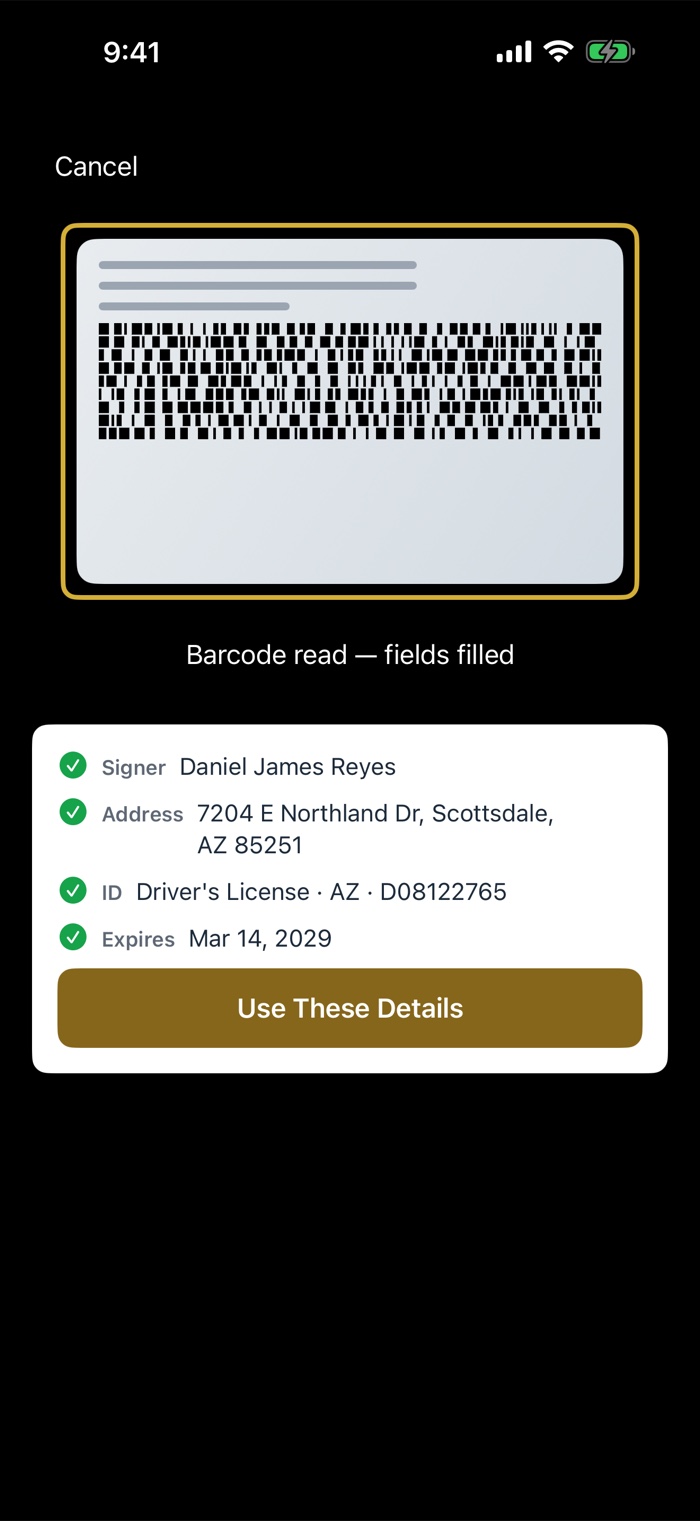
The license scan step. A barcode on the back of a driver's license sits inside a gold frame, with the message Barcode read, fields filled. Below, a card lists Signer, Address, ID type and number, and Expires, each with a green check, and a Use These Details button. This is a staged scan on the iOS Simulator, which has no camera.

Scan the license, skip the typing

Point. Read. Filled.

Aim the camera at the barcode on the back of a US driver's license or state ID and the signer's name, address, ID number and expiry fill themselves. Attest reads the text from the barcode. It never photographs or stores the ID.

No camera, or a worn barcode? Type it. Every field works by hand, and a notary who denies every permission still has a complete journal.

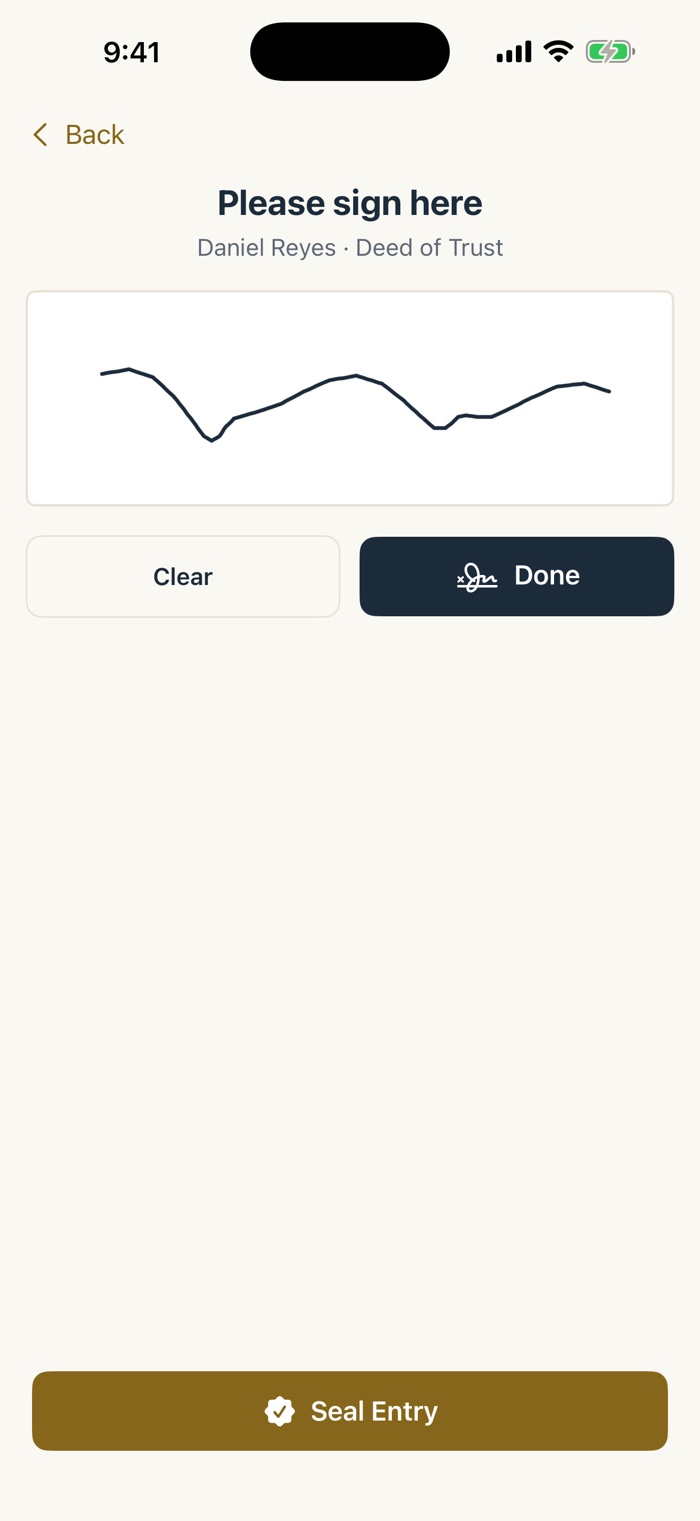
The signing step. The heading reads Please sign here, with the signer's name and the document below it. A large white signature canvas holds a signature, with Clear and Done buttons under it and a gold Seal Entry button at the bottom of the screen.

Hand it over

Please sign here.

The signer takes the phone, signs with a finger or an Apple Pencil, and hands it back. You tap Seal Entry and the stamp ceremony confirms it.

Loan signing agent? "Next document, same signer" and "Same document, next signer" reopen the entry with the details already in place, so an eight-document refinance becomes taps, not typing.

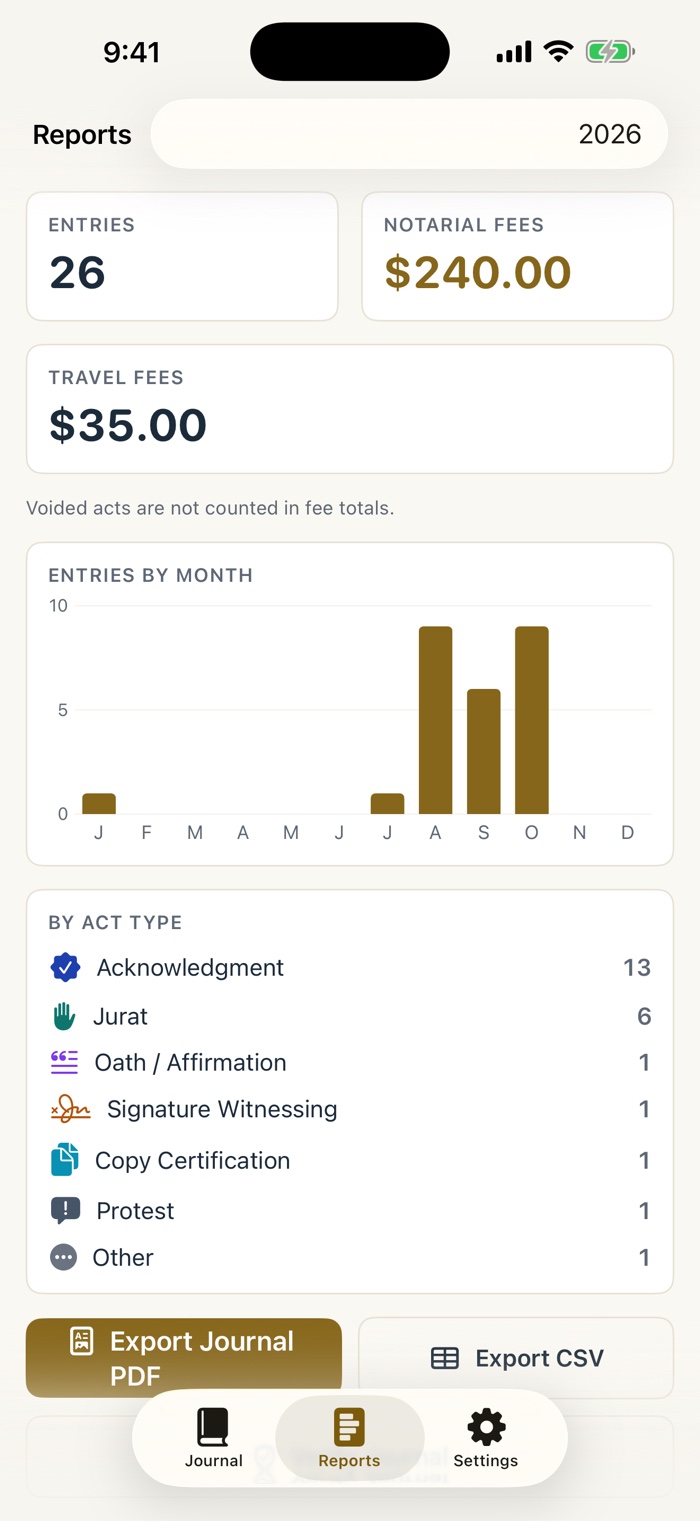
The Reports tab for 2026. Cards show 26 entries, 240 dollars in notarial fees and 35 dollars in travel fees. A bar chart shows entries by month, and a list shows counts by act type. Buttons at the bottom read Export Journal PDF and Export CSV.

The audit moment, handled

Search years of entries in a second.

Export the whole journal as a clean table PDF, any single entry as a certificate-style page for a records request, or everything as CSV. Every export carries the chain's fingerprint. Signing agent fees and travel fees total themselves for tax season, and voided acts are left out of the totals.

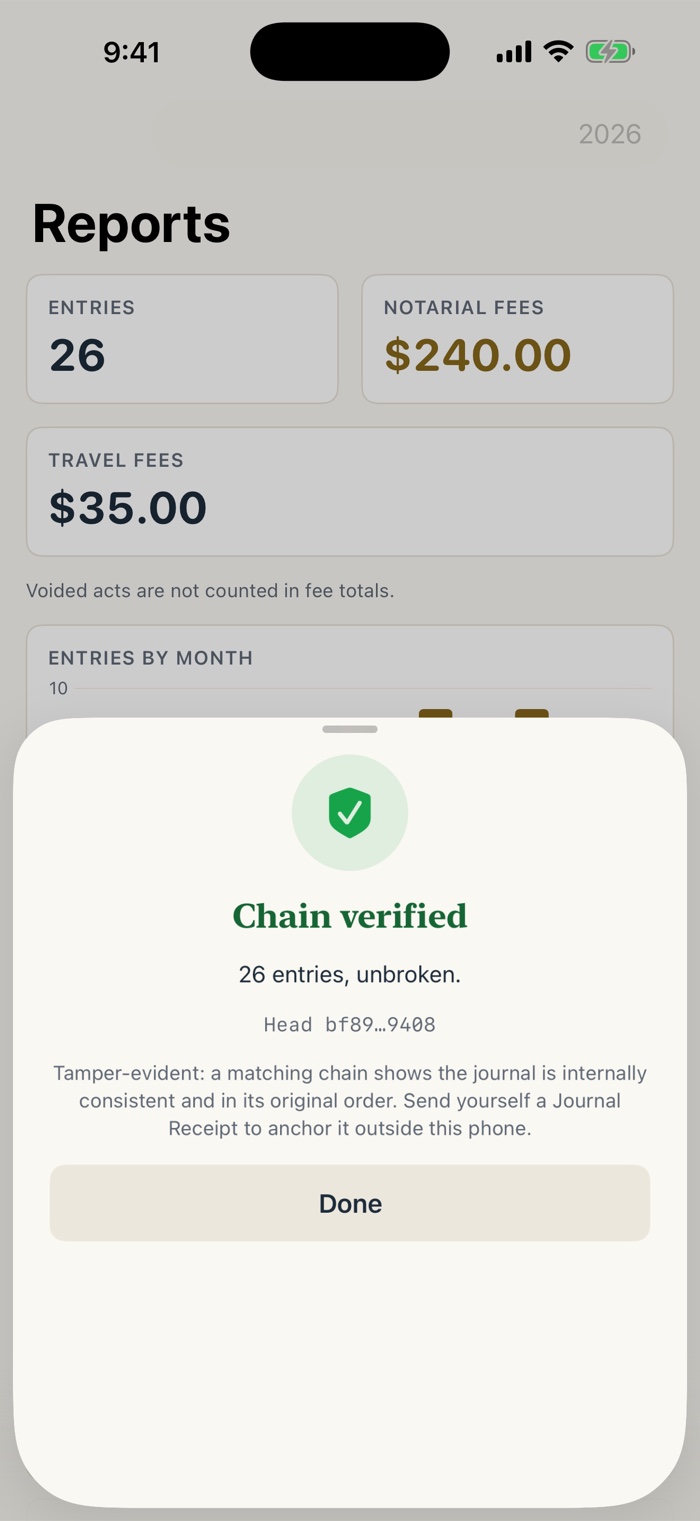
The Verify Journal result over the Reports screen. A green shield with a check, the heading Chain verified, and the line 26 entries, unbroken. A head hash is shown, then a note that a matching chain shows the journal is internally consistent and in its original order, and a Done button.

Verify Journal

One tap. Chain verified.

Verify Journal recomputes the whole chain on your phone and reports "Chain verified", or the entry where it breaks. A matching chain shows the journal is internally consistent and in its original order.

To anchor today's journal outside the phone, a Journal Receipt shares one line of text with the latest hash. Email it to yourself and you have a dated reference point.

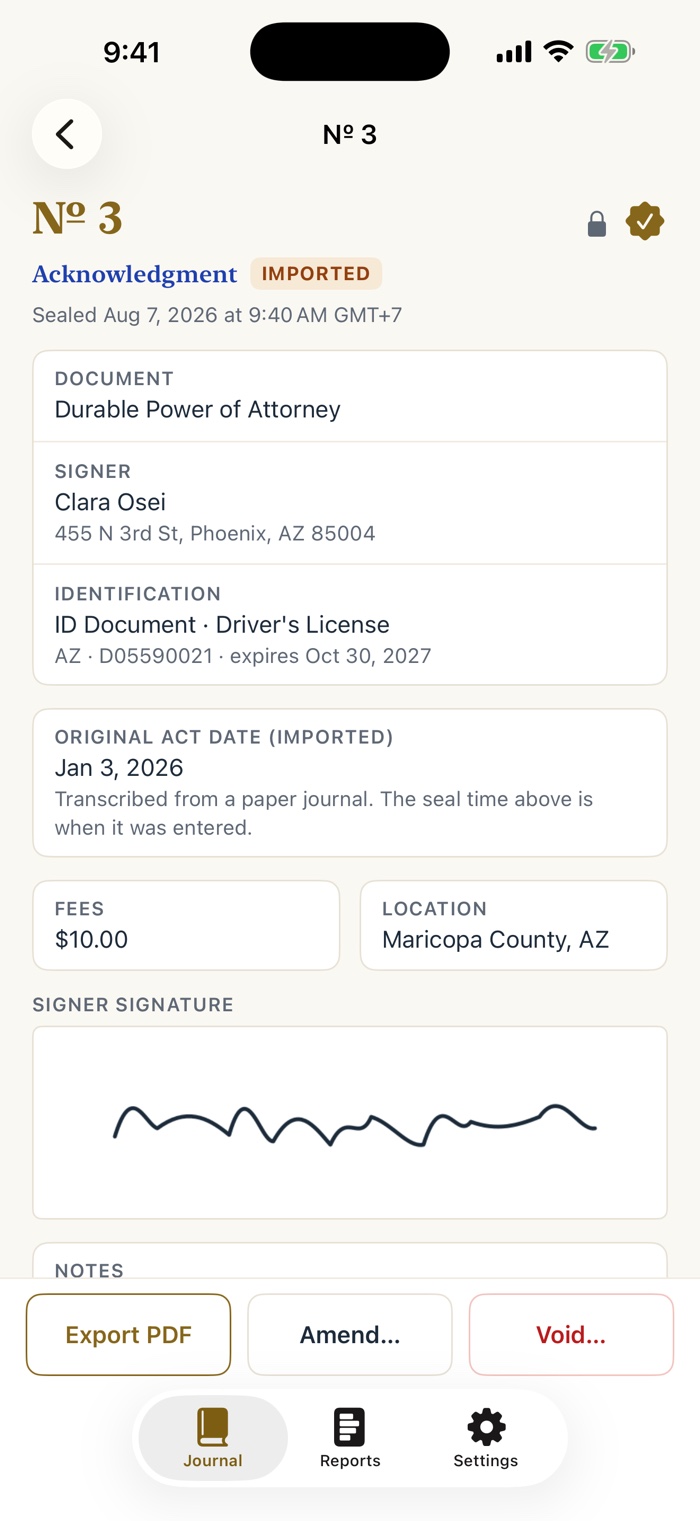
Entry number 3, an acknowledgment with an orange IMPORTED badge. A card reads Original act date (imported), Jan 3, 2026, Transcribed from a paper journal, and notes that the seal time above is when it was entered. Fee, location, and signature follow.

Your paper backlog, labeled

Bring the old book in, honestly.

Transcribe entries from your paper log book as historical entries. Each one is badged IMPORTED, the original act date is kept as data, and the time you entered it is shown separately. Never silent backdating.

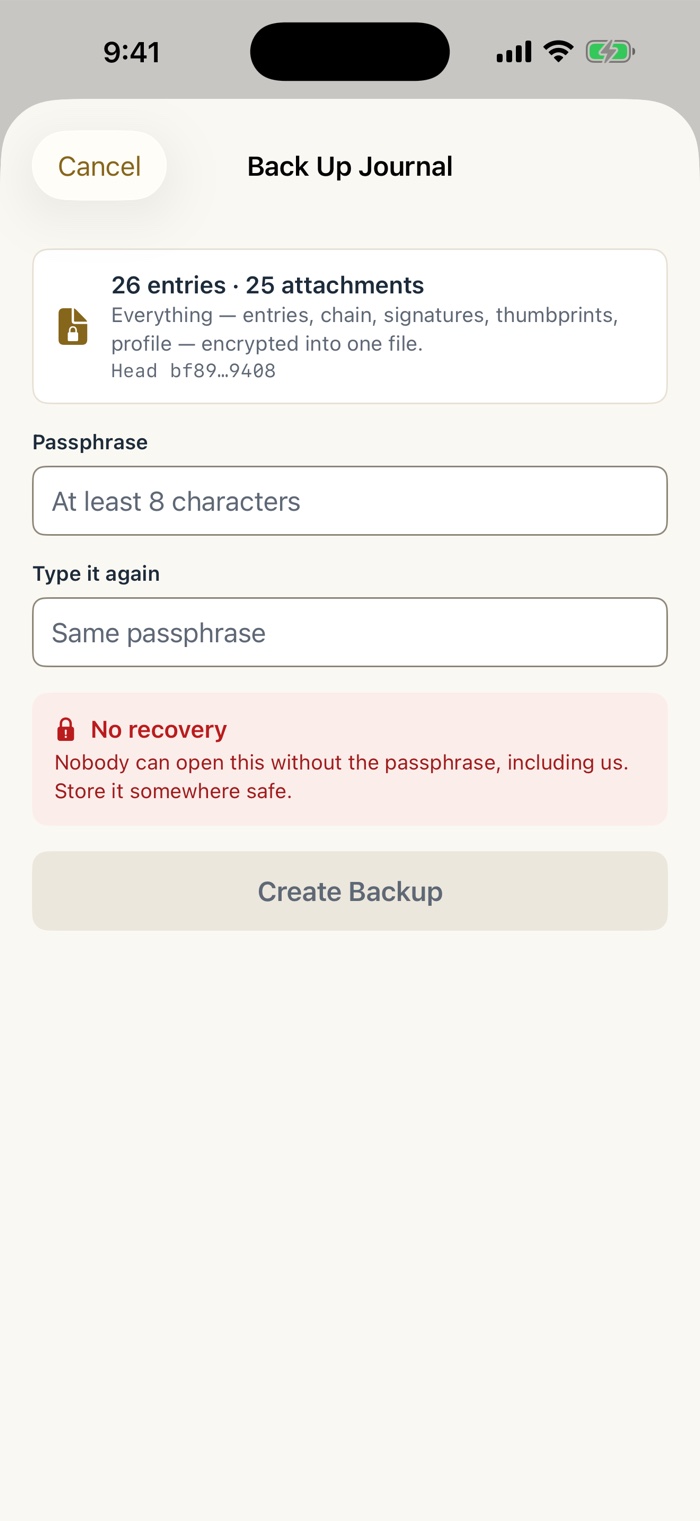
The Back Up Journal sheet. A card reads 26 entries, 25 attachments, and says everything is encrypted into one file. Passphrase and Type it again fields follow, then a red No recovery notice, and a Create Backup button.

A journal that outlives any subscription

One file. One passphrase.

States expect you to keep notarial records for years after your commission ends. Back up everything (entries, chain, signatures, thumbprints, profile) as one encrypted file and restore it on any iPhone or iPad.

Nobody can open a backup without the passphrase, including us. That is the point, and it is why the sheet says No recovery in plain words.

Their identity stays in your hand

No account. No server. No network connection at all.

Attest does not collect, store or transmit any data to us or to anyone. Signers' names, ID details, signatures and thumbprints stay on your device, protected by iOS encryption, and the app makes no network connections of any kind. When a signer asks "where does my information go?", you have a straight answer.

  • Works with no signal
  • No account, no login
  • Optional Face ID lock
  • Data Not Collected
The Back Up Journal sheet. A card says everything is encrypted into one file, with Passphrase fields below and a red No recovery notice that says nobody can open the backup without the passphrase.

Accessibility

Built in from the start.

Attest supports these App Store Accessibility Nutrition Labels on iPhone and iPad for the common tasks: reading the journal, making and sealing an entry, amending or voiding, verifying the chain, and exporting.

Pay once. Keep it for good.

One price. Every future update included. No entry cap, no trial clock, no account.

Attest: Notary Journal

$19.99

once.
Seven act types, signer ID scan, on-screen signature, optional thumbprint and GPS stamp, amendments and voids with cross-references, hash-chain verification and Journal Receipt, historical import, table PDF, certificate PDF and CSV exports, encrypted backup, Face ID lock, and every future update. No in-app purchases, no ads. Sold on the US App Store.
Download Attest on the App Store
Where notary records usually live
A paper journal
Permanent and sequential, but nothing searches it or totals your fees
by hand
A subscription e-journal
A yearly fee, for as long as you want to keep your records
every year
Attest
Sequential, tamper-evident, on your phone, and yours to keep
$19.99 once

Attest is a record-keeping tool. It does not perform notarizations or give legal advice. It meets or exceeds the content of a paper journal, but journal rules vary by state, so verify yours. California requires a bound paper journal for traditional notarizations, and Attest serves California notaries as a searchable backup record.

Questions from the signing table

Does Attest perform notarizations or give legal advice?

No. Attest is a record-keeping tool. It does not perform notarizations or give legal advice. It meets or exceeds the content of a paper journal, but journal rules vary by state, so verify yours.

I am a California notary. Can I use it?

California requires a bound paper journal for traditional notarizations. Attest serves California notaries as a searchable backup record, and it shows a paper-journal notice when you select CA.

Can I edit or delete an entry?

No. A saved entry is locked the moment the signer signs and you seal it. To correct a mistake, amend it with a new entry that points back to the original, or void an act that did not happen. The original stays legible either way.

What does the hash chain do?

Each entry stores a hash of its own contents plus the hash of the entry before it. Verify Journal recomputes the whole chain on your phone and reports Chain verified, or the entry where it breaks. A matching chain shows the journal is internally consistent and in its original order. For an anchor outside the phone, a Journal Receipt shares one line of text with the latest hash, and you can email it to yourself.

How does the license scan work?

Point the camera at the barcode on the back of a US driver's license or state ID and the signer's name, address, ID number and expiry fill in. Attest reads the text from the barcode. It does not photograph or store the ID. If you would rather type, everything works without the camera.

Where does my signers' information go?

Nowhere. It stays on your device, protected by iOS encryption, and the app makes no network connections. Journal entries, signatures and thumbprints are never sent to us or to anyone.

What if I lose my phone?

Back up the journal as one encrypted file with a passphrase you choose, and restore it on any iPhone or iPad. Nobody can open the backup without the passphrase, including us, so store the passphrase somewhere safe.

Can I bring in my old paper log?

Yes. Transcribe past entries as historical entries. They are badged IMPORTED, the original act date is kept as data, and the time you entered them is shown separately. Attest never silently backdates an entry.

Is it a subscription?

No. It is $19.99 once, with no account, no in-app purchases and every future update included. Attest is sold on the US App Store.

What do I need to run it?

An iPhone or iPad running iOS 16 or later. The signer can sign with a finger or an Apple Pencil.

Amend it. Never erase it.

A sequential, tamper-evident notary journal. Yours for $19.99, once.

Download Attest on the App Store
$19.99 · pay once