iPhone · Pickleball, padel & tennis · No subscription

Ditch the clipboard. Let the queue run itself.

CourtQueue is the rotation manager for open play. Add your players, tap Start, and it builds fair, skill-balanced games on up to four courts. When a game ends, one tap puts the most-rested four on court, and the next-up list sits on your Lock Screen.

Download on the App Store
$2.99 once. About the price of one pickleball.
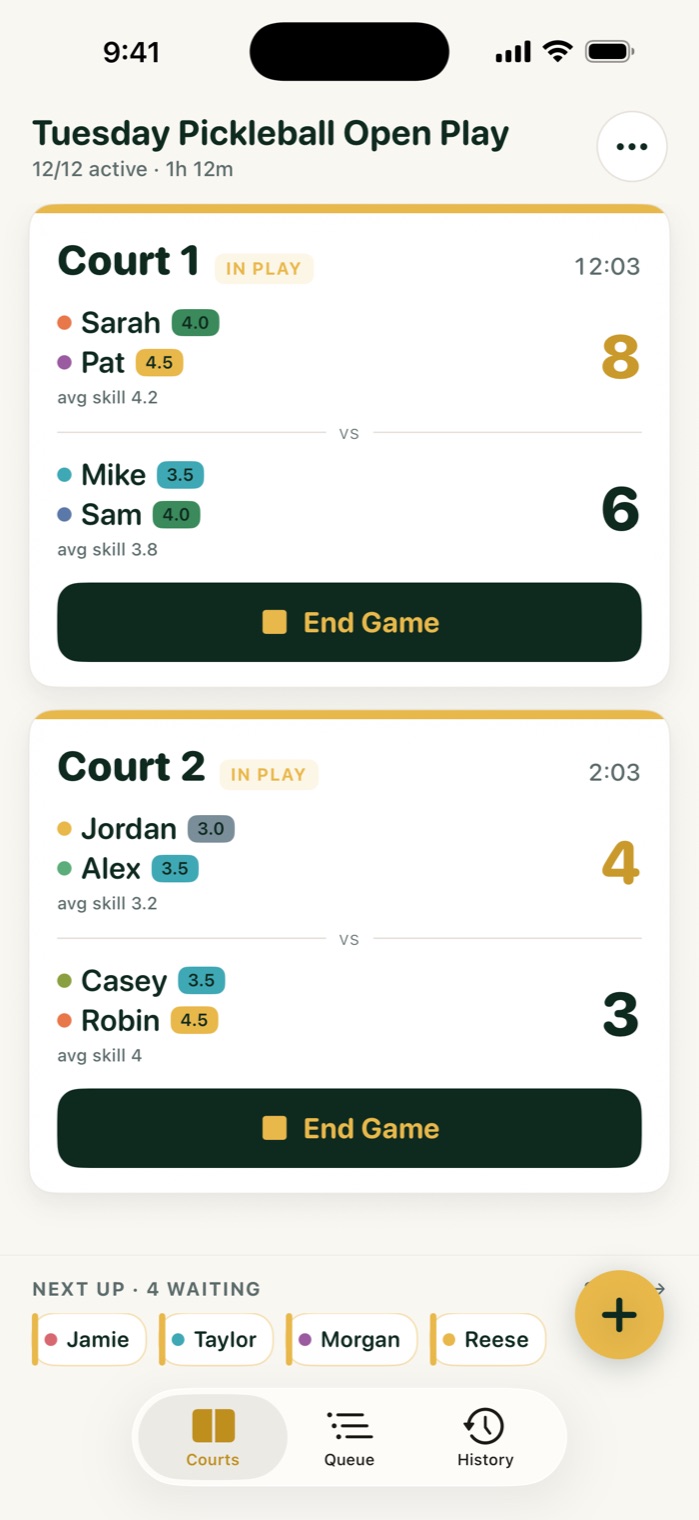
CourtQueue courts screen: two courts in play with players, skill levels and live scores, and four players waiting in the Next Up strip
Balanced · 4.0 vs 4.0
Next up Jamie · Taylor · Morgan · Reese

27-second tour

Meet Dink. He explains CourtQueue faster than we can.

Add players, tap Start, save and rotate. That's the whole job. Turn your sound on.

1 tap
To score a game and rotate the next four on
4 courts
Running at the same time, each with its own card
±0.5
Team skill averages, kept close by the balancer
0 accounts
For you or your players. Nobody signs up
1
Add your players
Type names, tag skill levels from 2.5 to 5.0, and set how many courts you have. The roster is saved for next week.
2
Tap Start
CourtQueue fills every court with balanced doubles teams and lines everyone else up in the queue.
3
Save & Rotate
When a game ends, enter the score and tap once. The four players who've rested longest walk on.
Built for the person holding the phone

You came to play, not to run a spreadsheet.

Every busy court has one organizer keeping a list in the Notes app and trying to remember whose turn it is. CourtQueue does that part so you can get back on court.

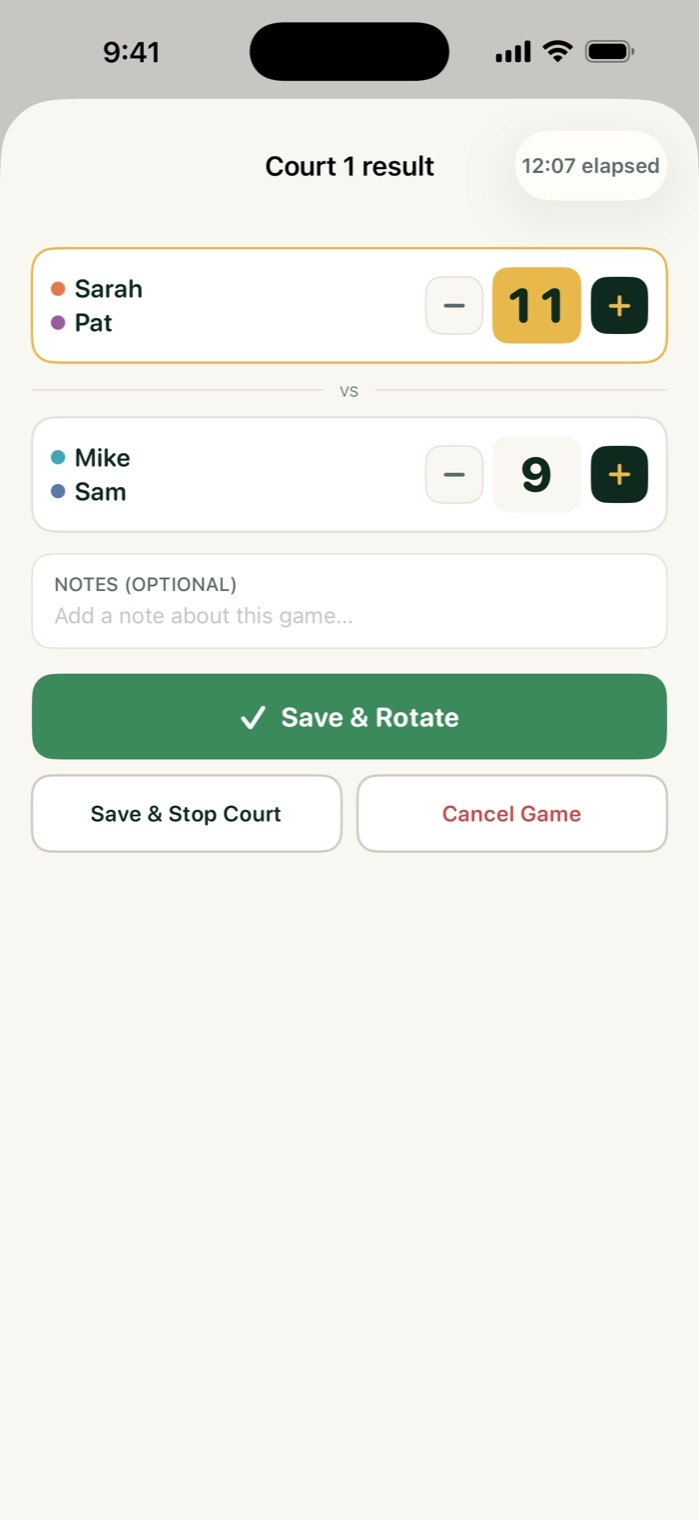
Court 1 result sheet with an 11 to 9 score and a green Save and Rotate button
One-tap rotation

Game over? Score it, tap once, next four are on.

Tap End Game, bump the score with big plus and minus buttons, and hit Save & Rotate. The next four most-rested players fill the court right away. Nobody argues about who sat out longer, because the app kept track.

Need a court back for a lesson? Save & Stop Court takes it out of the rotation.

Next up, on your Lock Screen

No more "am I up yet?"

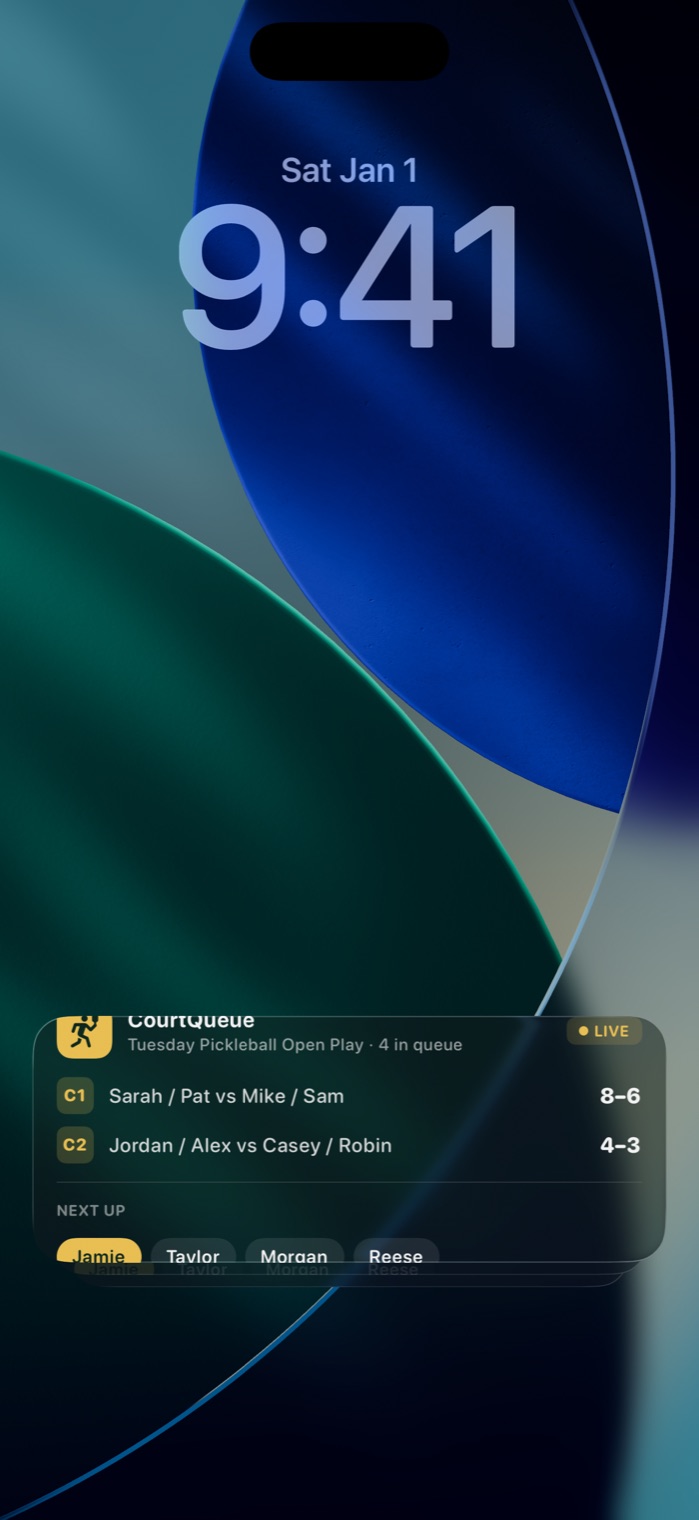
A Live Activity shows every court's matchup and score, plus the next four in the queue, on your Lock Screen and in the Dynamic Island. Hold your phone up and the bench can see who's next without asking you.

It updates on every score and rotation, and works with no signal at all.

iPhone Lock Screen with the CourtQueue Live Activity listing two courts, their scores, and the next four players
Two court cards showing each team's players, skill chips and average skill
Balanced matchups

Fair games, without you doing the math.

The default mode keeps each team's average skill within half a point, and it mixes up partners so the same two people don't end up together three games running. The strong players still get competitive games, and nobody gets stuck on a lopsided court all night.

BalancedSkill-matched teams with partner variety
Mexican Round RobinWinners move up, losers move down
RandomA pure social shuffle
ManualYou pick the four for each court
Session summaries

Wrap the night with the stats everyone asks about.

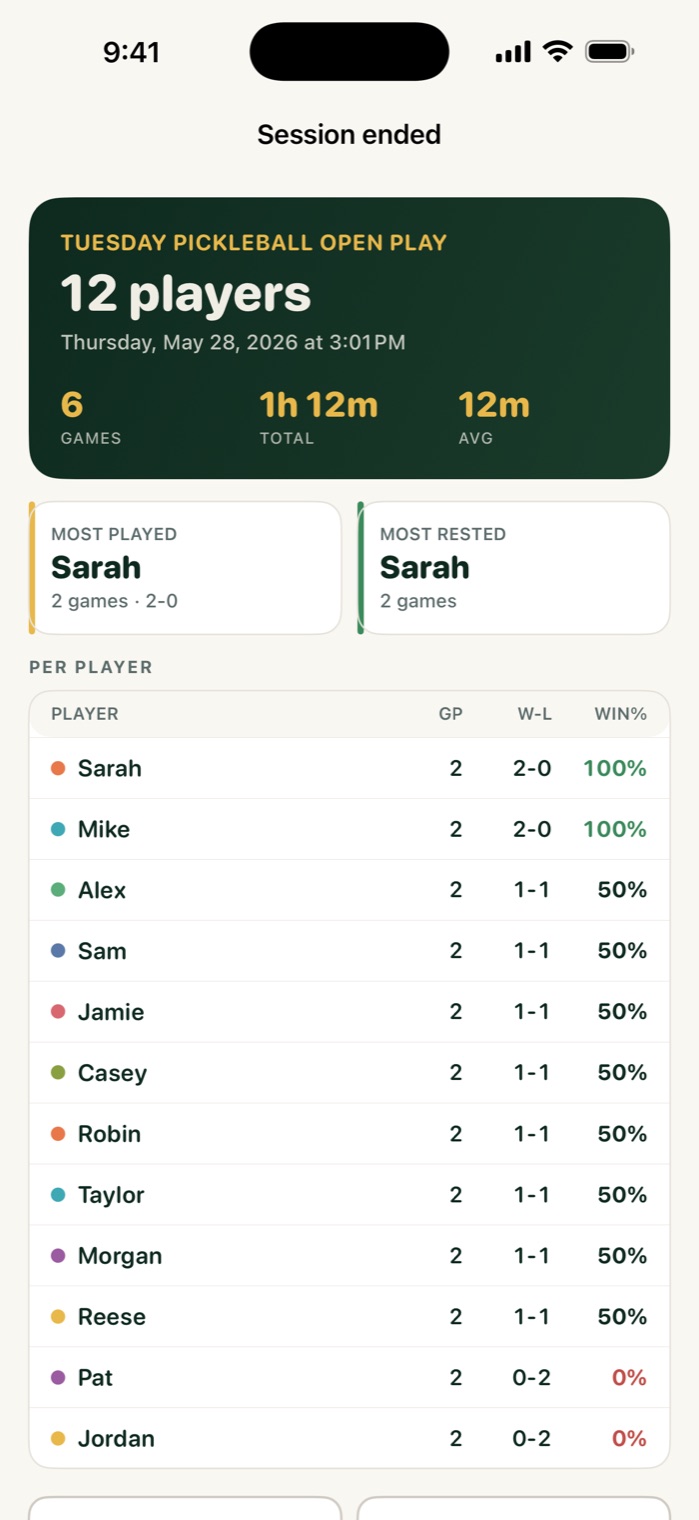
End the session and CourtQueue totals it up for every player: games played, wins, losses, win rate, and favorite partners. Share the summary as text to the group chat, or export a CSV for your club's records.

Past sessions stay in History, and the roster carries over to next week.

Session summary with twelve players, six games, total time, and a per-player win and loss table
Yours, privately

No account. No cloud. No "invite your players."

CourtQueue runs on one phone, the organizer's. Your players don't download anything, nobody signs up, and nothing is uploaded anywhere. It keeps working in a metal-roofed gym with no bars.

Works fully offline
Zero data collected
No ads, no tracking
CSV export anytime

Pay once. Play forever.

A yearly subscription for a queue is silly. Buy it once and use it every pickup night for the next decade.

CourtQueue — Open Play
$2.99
once.
Every rotation mode, up to four courts, the Lock Screen Live Activity, session summaries, CSV export, and every future update. No in-app purchases, no ads, no "pro" tier.
Download on the App Store
What running open play usually costs
Social-network court apps
Queue tools bundled with a subscription and a sign-up for every player
$12 / yr
"Free" rotation apps
Paid for with ads, accounts, and a pile of features you don't need
your data
The clipboard
Crossed-out names, tally marks, and someone always swears they were first
your sanity
CourtQueue
Fair games, one-tap rotation, next up on your Lock Screen
$2.99 once

Questions from the bench

Does everyone need to download it?
No. Only the organizer does. Players just show up and play. The Lock Screen Live Activity lets the bench check who's next on your phone.
Which sports does it work for?
Any doubles open play on 1 to 4 courts: pickleball, padel, and tennis. Skill tags use the familiar 2.5–5.0 scale, and you can leave players unrated.
How does it decide who plays next?
In Balanced mode, the players who have rested longest go on next, split into teams whose average skill is within 0.5 of each other, while avoiding repeat partners. Mexican Round Robin, Random, and Manual modes are one tap away.
Can people join or leave mid-session?
Yes. Add a late arrival or mark someone inactive at any time, and the queue adjusts on the next rotation.
Does it need an internet connection?
No. Everything runs on your iPhone, including the Live Activity. There's no account and no cloud, and the App Store privacy label reads "Data Not Collected."
What do I need to run it?
An iPhone running iOS 17 or later. The Live Activity and Dynamic Island appear on devices that support them.

Next pickup night, leave the clipboard at home.

Build your roster tonight. CourtQueue handles the rotation from there.

Download on the App Store
$2.99 · pay once