Seed starting schedule · iPhone & iPad · Pay once

Two dates in. A whole season out.

The hardest part of growing from seed is the math: count six weeks back from a frost date, for every veggie in the bed, twice a year. Type your last spring frost and your first fall frost once, and Sow does the counting. It works offline, in any country, and it knows which of your seed packets are past it.

Download Sow on the App Store

$6.99 once. No subscription, no account, every future update included.
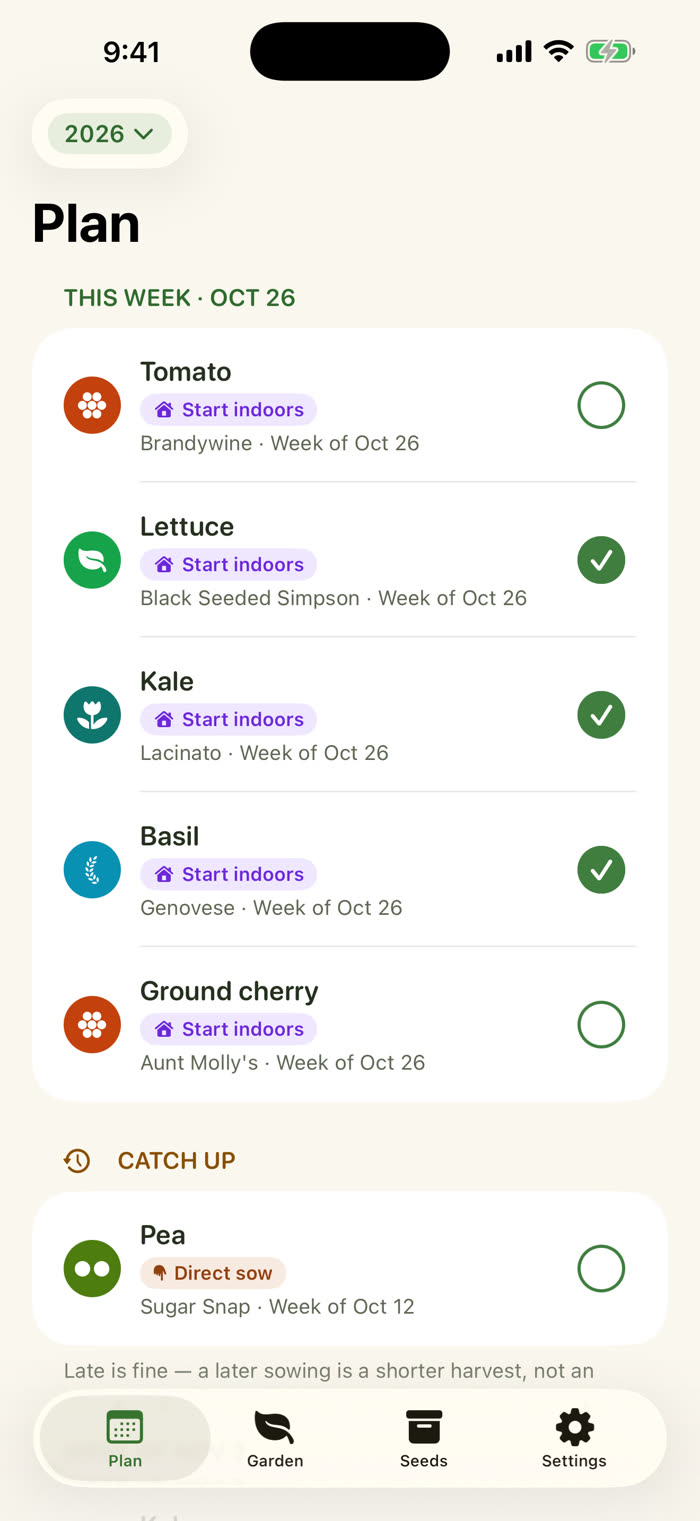
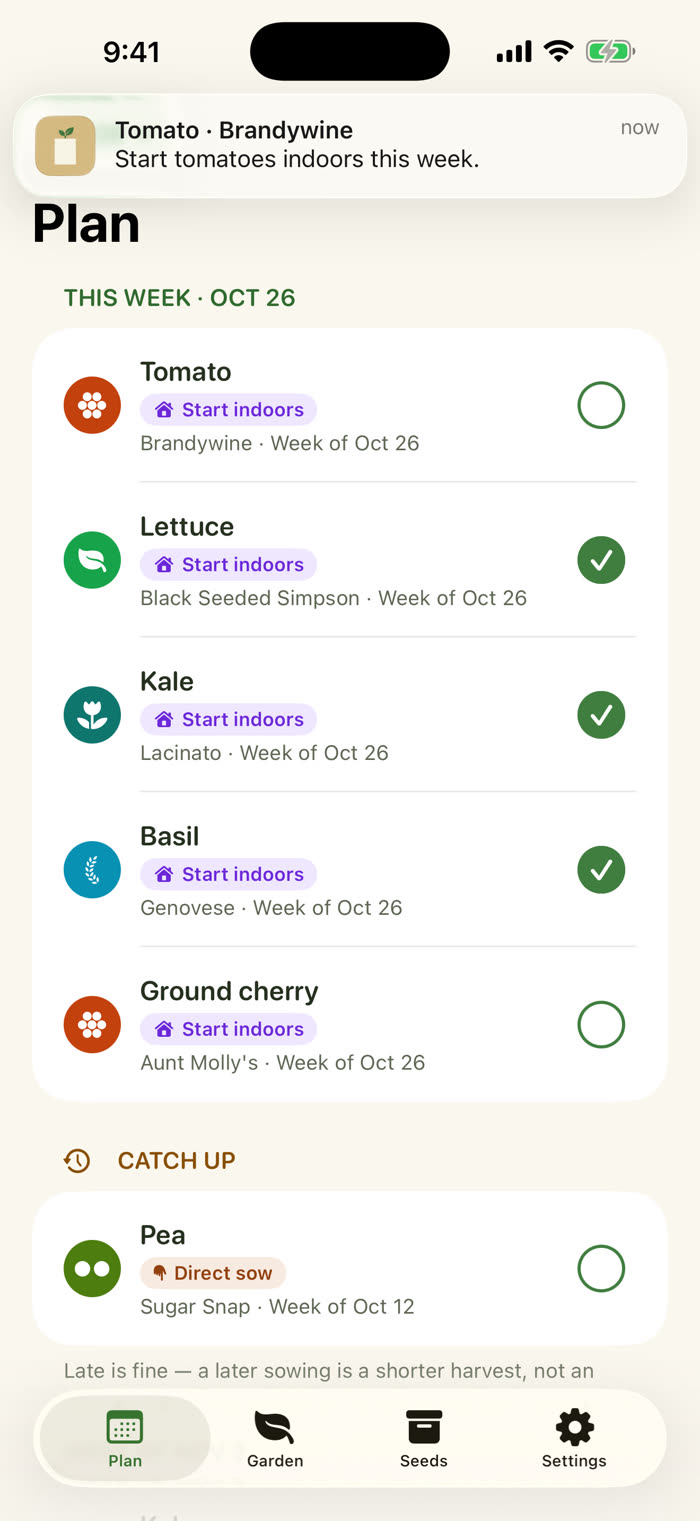
Sow's Plan tab for the week of October 26. Tomato, lettuce, kale, basil and ground cherry each show a Start indoors task for this week, with checkmarks on the ones already done. A Catch up section lists a pea direct sow from two weeks earlier.

34-second tour

Watch a season get counted.

Two frost dates, the week-by-week plan with its math, and the seed box. The captions are on screen, and the sound is one tap away.

Read the narration

The seed packet says: start six weeks before last frost. Then you count backwards, for every crop, twice a year.

This is Sow. Type your last spring frost, and your first fall frost. Two dates. That's the whole setup.

Every crop becomes a week-by-week plan, with the math shown. The seed box checks each packet: good, test, or replace.

South of the equator? Your dates. Your season. Pay once. Works offline. No account.

Sow. Two dates in, a whole season out.

Seed starting, scheduled

Your dates. Your season.

Sow does not look up a zone or guess your climate. It counts from the two dates you type, so the schedule is as right as your own knowledge of your own beds.

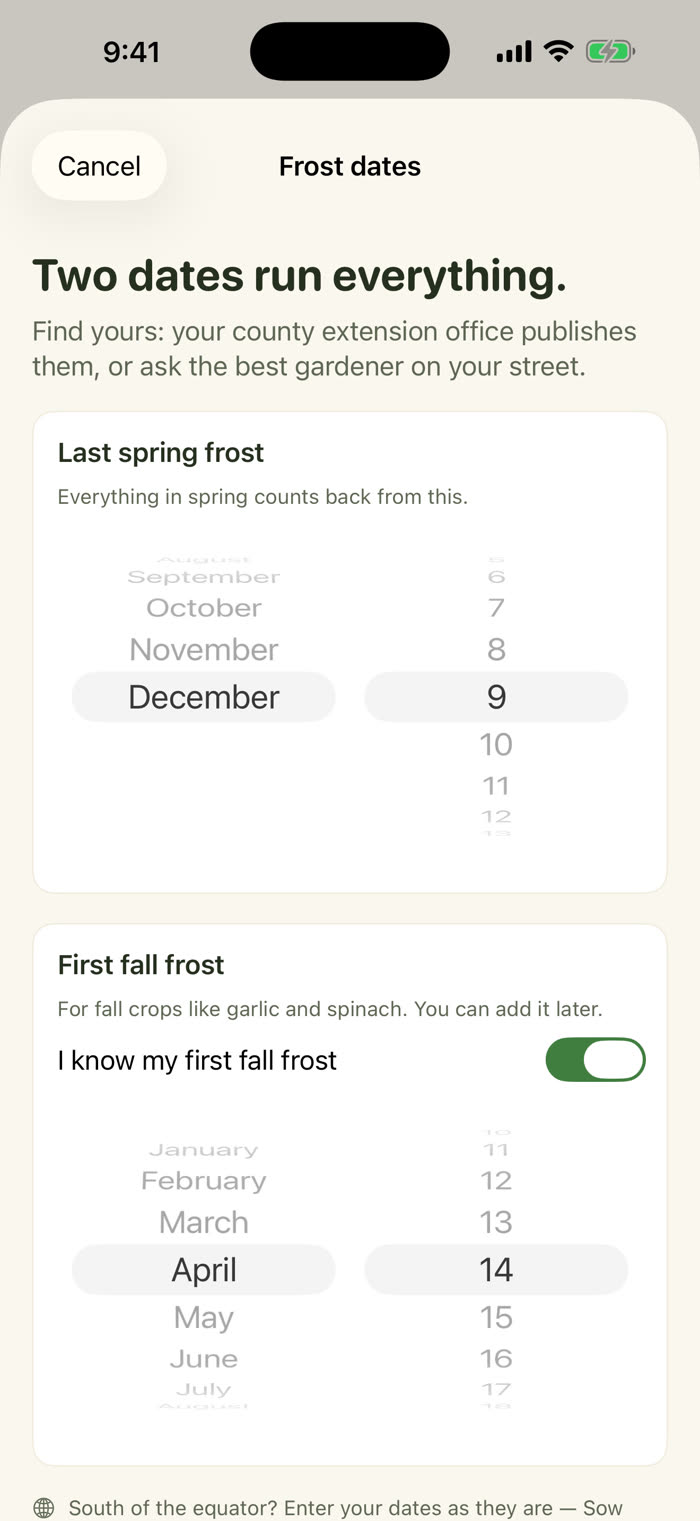
The Frost dates sheet. The heading reads Two dates run everything. A month and day wheel is set for last spring frost, and a second wheel for first fall frost with its switch on. A note at the bottom reads South of the equator? Enter your dates as they are.

Two dates

Type them once. Use them all season.

Your county extension office publishes your frost dates, and so does the best gardener on your street. Spin two month and day wheels and you are done. Any month is allowed, so the dates work north or south of the equator, and in any country.

No ZIP lookup, no zone map, no hard-coded zone 7. The dates you type are the dates Sow uses.

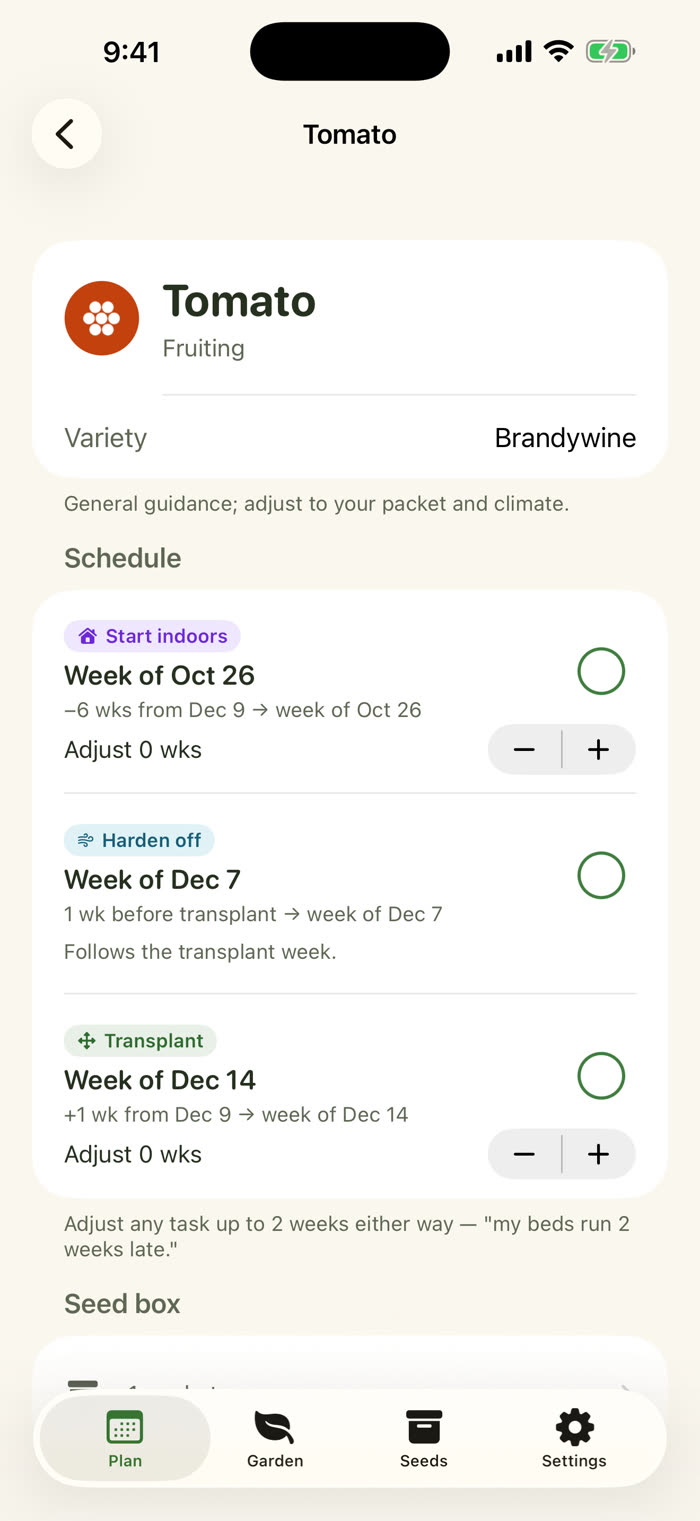
The tomato plan. Start indoors is week of Oct 26, shown as minus 6 weeks from Dec 9. Harden off is week of Dec 7, one week before transplant. Transplant is week of Dec 14. Each task has a checkbox and a plus and minus control to adjust it.

The math, shown

Every task shows its work.

Each crop becomes a week-by-week checklist: start indoors, harden off, transplant, direct sow. Every line says how it was counted, like "6 wks before last frost, week of Mar 16", so you can see it and disagree with it.

Nudge any task up to two weeks for your microclimate. Offsets follow common extension-office conventions, and your seed packet outranks any chart.

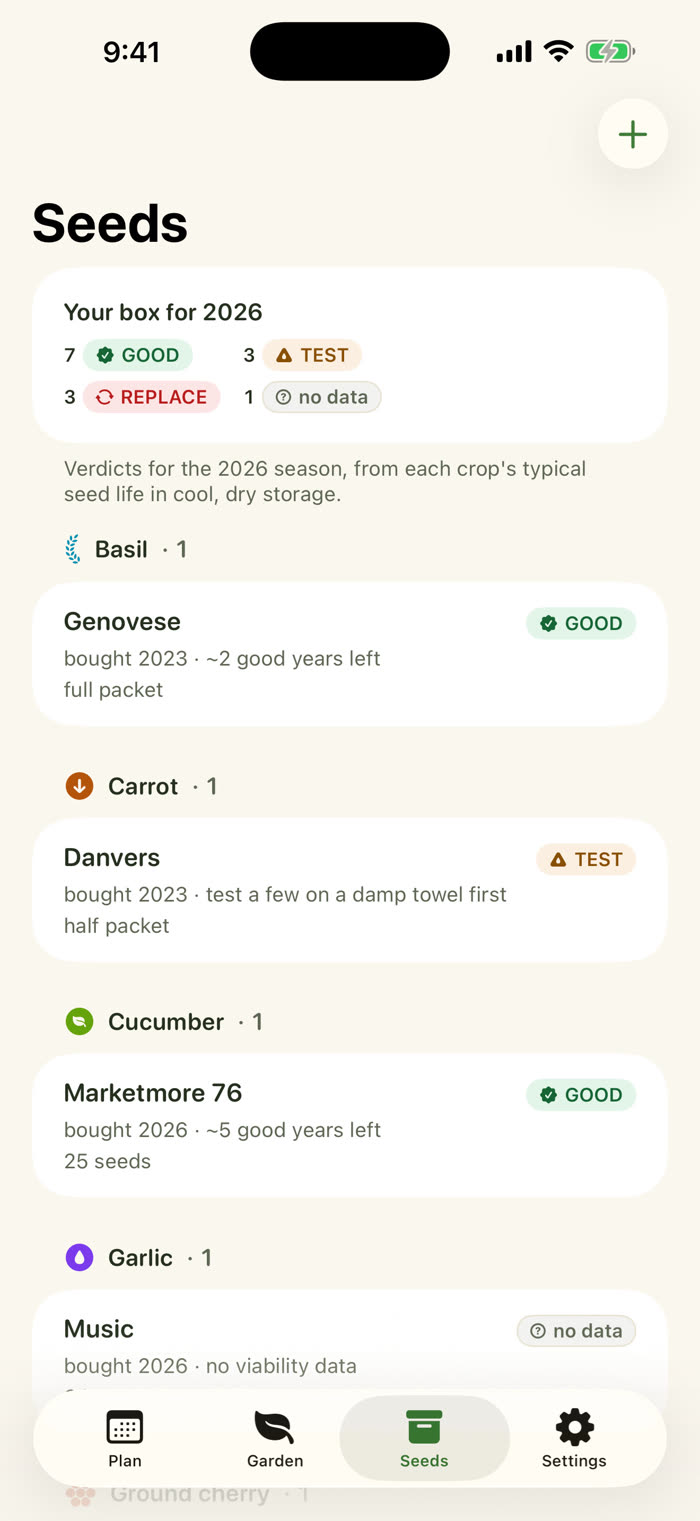
The Seeds tab. A summary reads Your box for 2026: 7 good, 3 test, 3 replace, 1 no data. Below, packets are grouped by crop with a verdict on each, for example Genovese basil good, Danvers carrot test.

The seed box

Which packets are still good?

Log every packet with the year you bought or saved it. Sow gives each one a viability verdict: still good, test a few on a damp towel first, or replace. Stop sowing dead seed. Stop rebuying live seed.

Each plan shows whether you already have seed for it, so the January order writes itself.

  • GOOD
  • TEST
  • REPLACE
  • no data

Verdicts are estimates from typical seed-storage tables. Custom crops show "no data" until you add their germination years.

A Sow reminder banner at the top of the screen reads Tomato, Brandywine: Start tomatoes indoors this week. The Plan tab sits below it.

Reminders that arrive on time

"Start tomatoes this week."

Optional local reminders land on the Monday morning of the week a task is due, from your phone, with no server involved.

Behind? Missed tasks slide into a quiet Catch up list. It never goes red and it never nags. A later sowing is a shorter harvest, not an emergency.

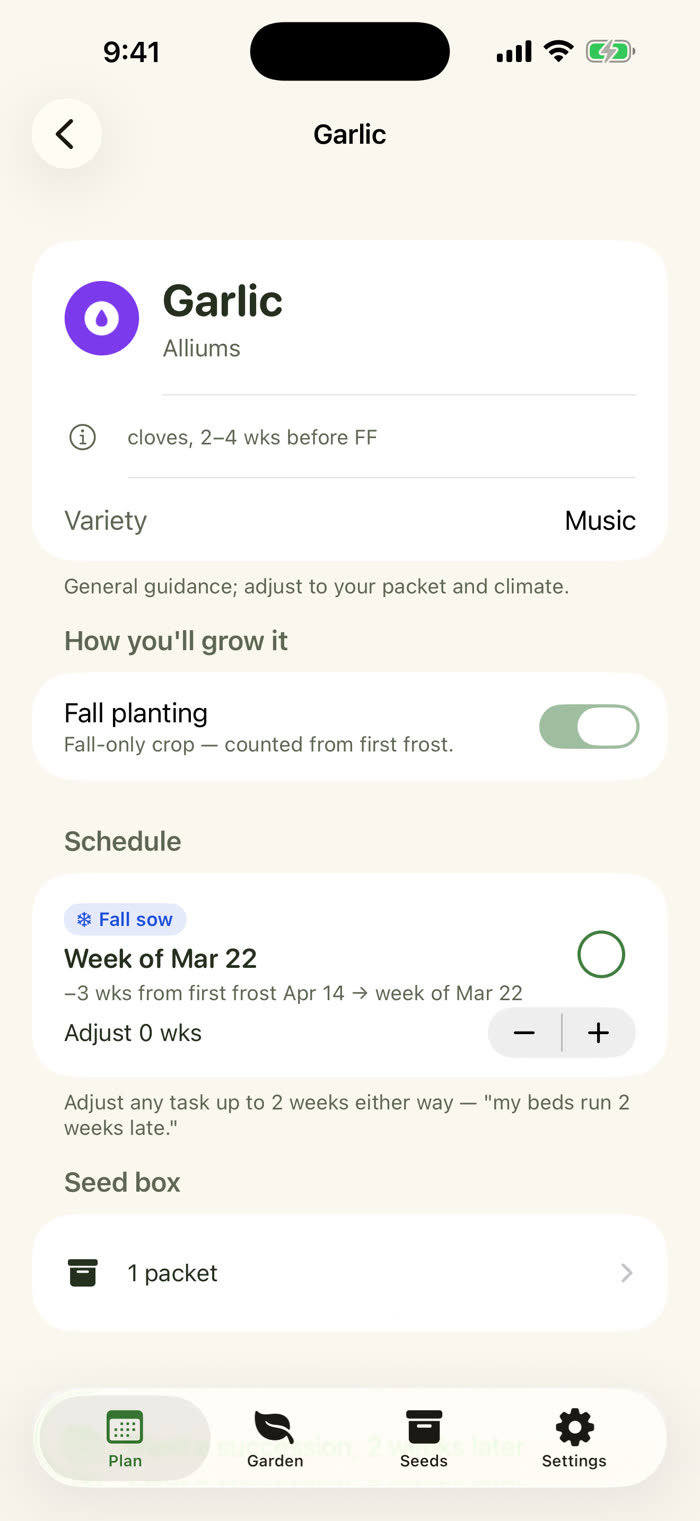
The garlic plan with Fall planting switched on. The task reads Fall sow, week of Mar 22, counted as 3 weeks from first frost Apr 14, with an adjust control. A note says cloves, 2 to 4 weeks before first frost.

Fall crops, too

Garlic and spinach count from first frost.

Spring tasks count back from your last spring frost. Fall crops like garlic and spinach count back from your first fall frost, using the second date you typed.

Succession in one tap: "Lettuce, round two" copies a plan two weeks later. And when next year comes, Plan next year copies your whole crop list into a fresh season.

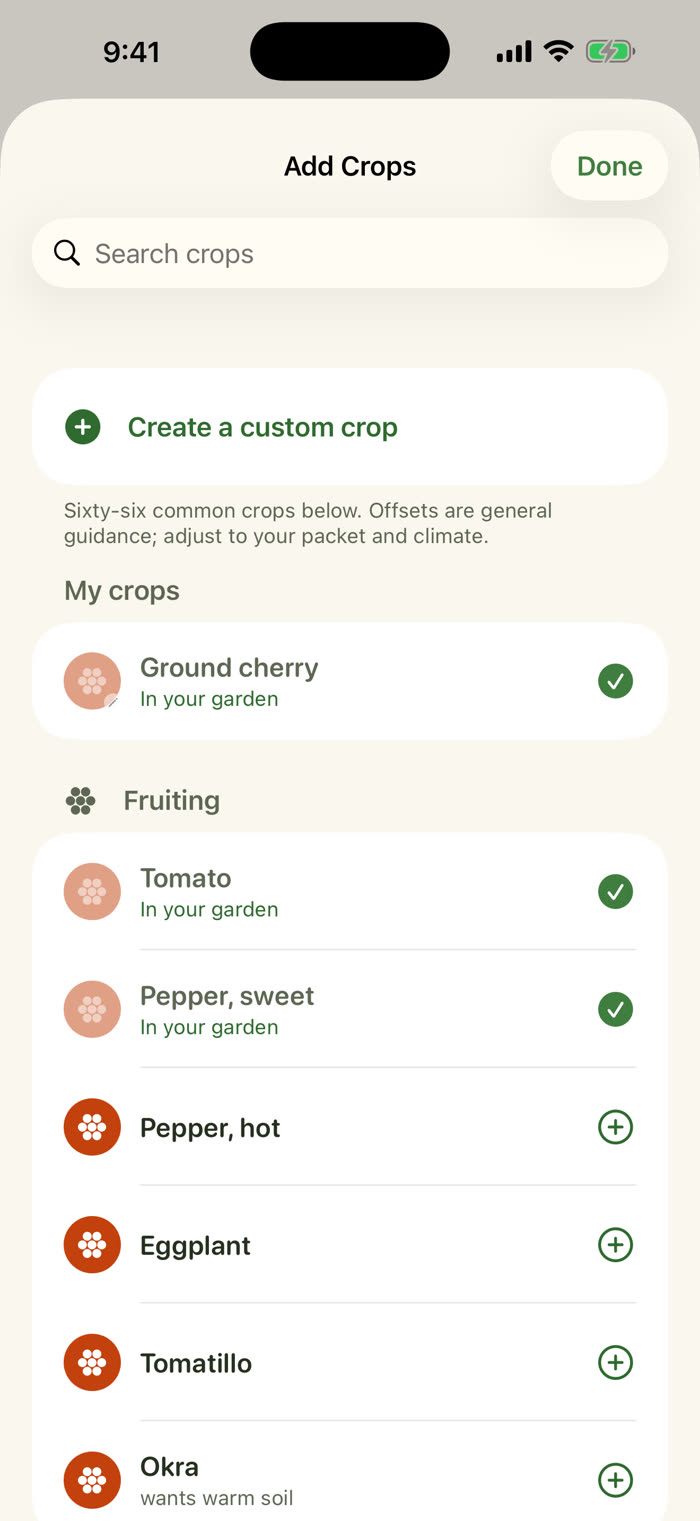
The Add Crops sheet with a search field and a Create a custom crop row at the top. My crops lists Ground cherry, Tomato and sweet pepper with checkmarks. Fruiting crops such as hot pepper, eggplant, tomatillo and okra follow, each with an add button.

66 crops, plus your own

Can't find it? Add it.

Sixty-six vegetable, herb and flower crops come built in. Add a custom crop with your own timings and germination years, and it gets the same plan and the same seed box as everything else.

Grow ground cherries, a local pepper or something your neighbor swapped you? It is a full crop with its own plan, not a note.

Your garden stays yours

No sign-in. No server. No network connection at all.

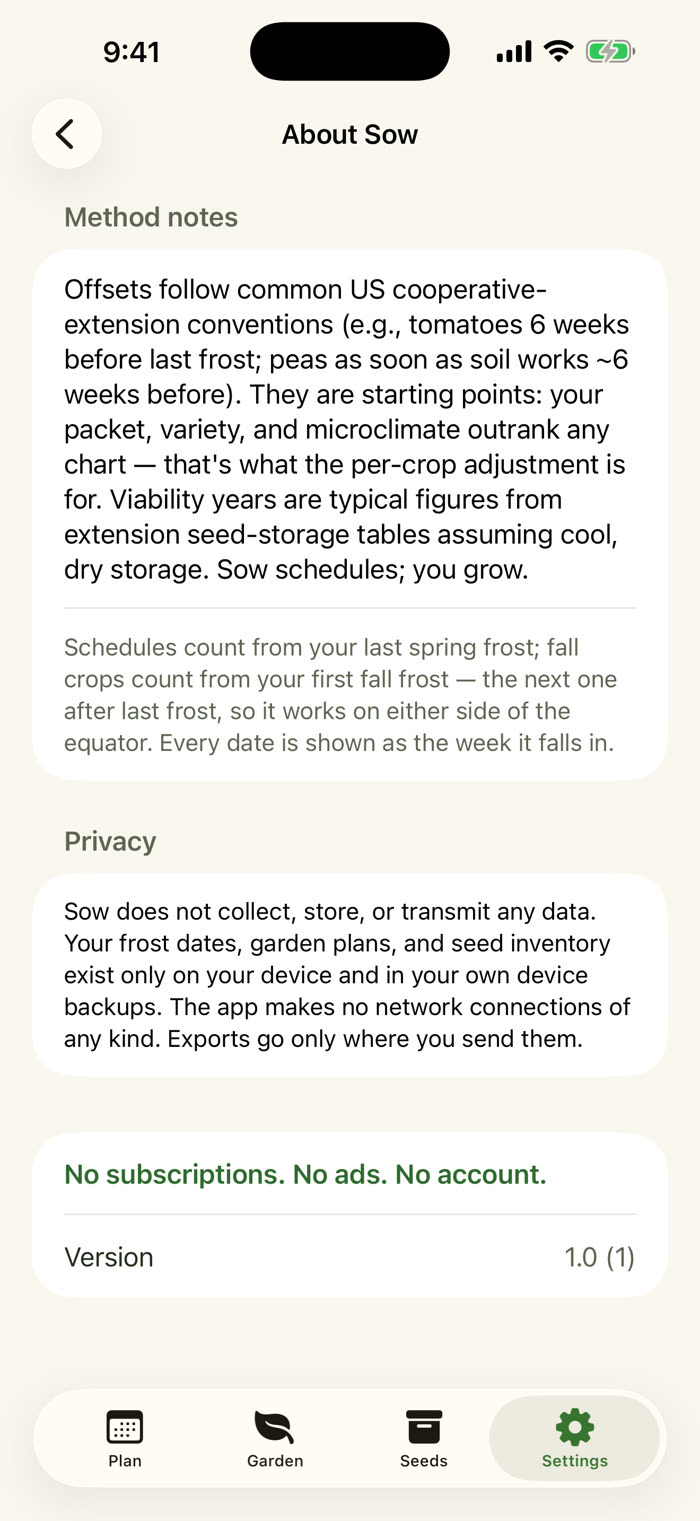
Sow does not collect, store or transmit any data. Your frost dates, plans and seed box live on your phone, and the app makes no network connections of any kind. Export your plan and seed inventory as a CSV whenever you like, and send it wherever you choose.

  • Works with no signal
  • No account, no login
  • CSV export, any time
  • Data Not Collected
The About Sow screen. A Privacy section says Sow does not collect, store or transmit any data. At the bottom, a line reads No subscriptions. No ads. No account.

Accessibility

Built in from the first line.

Sow supports these App Store Accessibility Nutrition Labels for the common tasks: setting frost dates, adding crops, reading and checking off the weekly plan, adjusting a task, and adding and reviewing seed packets.

Pay once. Plant every year.

One price. Every future update included. No subscription, no account, no paywalled vegetables.

Sow: Seed Starting Scheduler

$6.99

once.
Frost-date scheduling for 66 crops plus your own, week-by-week plans with the math shown, optional reminders, fall crops, succession copies, the seed box with packet viability, CSV export, and every future update. No in-app purchases, no ads.
Download Sow on the App Store
Where seed-starting math usually lives
The back of the packet
"Six weeks before last frost," for every crop, recounted each spring
by hand
A spreadsheet
Works until you want a reminder, or to know which packets are old
your weekends
Sow
Your two dates, your crops, your seed box, on your phone
$6.99 once

Questions from the seed tray

Where do I find my frost dates?

Your county extension office publishes them, and so does the best gardener on your street. Type your last spring frost and, if you want fall crops, your first fall frost. You can add the fall date later.

Does it work in my country, or south of the equator?

Yes. Sow has no ZIP lookup and no zone map, and the frost date wheels accept any month and day. A gardener in Brisbane types a last frost in the austral spring and Sow counts from that, exactly as it would for a gardener in Ohio. Schedules count from the dates you enter.

What if my climate has no frost?

Sow counts back from the two dates you type, so use the dates your growing season opens and closes. The offsets follow common extension-office conventions, which were written for frost climates, so lean on your own packet and your own experience and use the adjust control.

How does the seed box decide a packet is old?

Each crop has a typical number of good years when seed is stored cool and dry. Sow compares that with the year on your packet and shows GOOD, TEST or REPLACE. These are estimates from typical storage tables, not guarantees, so a damp-towel test is the real answer for borderline packets.

Does it sync, or need an account?

No account and no sync. Everything lives on your device, and the app makes no network connections. Export your plan and seed inventory as a CSV whenever you want a copy.

Is it a subscription?

No. It is $6.99 once, with no in-app purchases and every future update included.

What do I need to run it?

An iPhone or iPad running iOS 16 or later. Buy it once and it is yours on every device signed in with your Apple Account.

Two dates in. A whole season out.

Seed starting, scheduled. Yours for $6.99, once.

Download Sow on the App Store
$6.99 · pay once